When interaction effects are hard to explain, try nested effects
contrast coding
multiple regression
R
tutorial
Author
Jan Vanhove
Published
June 3, 2026
When analysing a factorial experiment, R’s default regression output gives you the main effects and interaction effects. The meaning of the resulting parameter estimates can be tricky to explain, especially that of the interaction effect: in essence, it tells you what the difference between two differences is. Nested effects, which immediately tell you what the differences themselves are, are often easier to interpret. This post shows how you can obtain such nested effects in R.
Example data
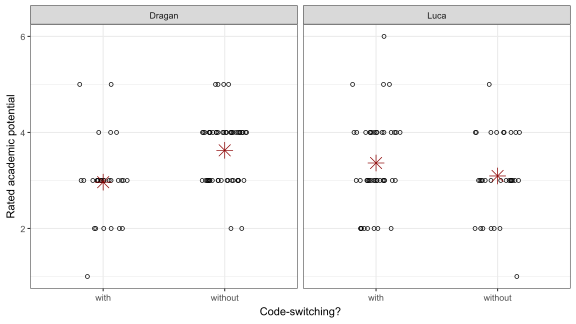
Figure 1 shows data from an experiment with a two-by-two design carried out by Berthele (2012). French-speaking students at a university for teacher education were played a recording of what they thought was a first-language German boy speaking French. About half of the students were told that the boy had a typical Swiss-German name (e.g., Luca); the others were told that he had a name associated with the Balkan region (e.g., Dragan). Furthermore, about half of the recordings contained code-switches (i.e., the boy would occasionally use German expressions when speaking French); the other half of the recordings did not contain any such code-switches. The future teachers were asked to rate the boy’s academic potential on a scale from 1 to 6, with 6 being the highest.
Figure 1: Data from Berthele’s (2012) experiment. Each circle shows a rating given by a teacher trainee. The red stars highlight the cell means.
Interaction effects
Figure 1 suggests that there is some interaction going on in the data: ‘Dragan’s’ ratings tend to be higher than ‘Luca’s’ when there is no code-switching, but lower where there is code-switching. It’s pretty easy to model this interaction in R:1
Code
mod.lm <-lm(Potential ~ Name*CS, data = d)summary(mod.lm)$coefficients
You need a bit of practice to wrap your head around what these parameter estimates actually refer to, however. The parameter estimate for NameLuca (\(0.40 \pm 0.20\)), for instance, tells you that the ratings for ‘Luca’ tend to be \(0.40\) points higher than those for ‘Dragan’ if the recording contains code-switches. Next, the parameter estimate of CSwithout (\(0.66 \pm 0.20\)), tells you that the ratings for recordings without code-switches tend to be \(0.66\) points higher than those with code-switches if the students were told that the boy is called Dragan. The estimate of the interaction parameter NameLuca:CSwithout (\(-0.93 \pm 0.28\)) tells you that the absence of code-switches was \(0.93\) points more detrimental for ‘Luca’ than it was for ‘Dragan’. Equivalently, it tells you that the presence of code-switches was \(0.93\) points more detrimental for ‘Dragan’ than it was for ‘Luca’. Also equivalently, it tells you that labelling the recording ‘Dragan’ instead of ‘Luca’ is \(0.93\) points more detrimental on average for recordings with code-switches than for recordings without code-switches.
If you skipped the previous paragraph: I understand. Even for a fairly simple two-by-two design, figuring out the precise meaning of the estimated parameters requires sitting down with a pencil and a piece of paper; see Chapter 10 in my statistics booklet. Thankfully, however, you can usually make the output of statistical models such as the one above more readily interpretable both to yourself and to your audience by changing the coding scheme. I’ve explained how this can be done in a previous blog post.
Nested effects using R’s shorthand notation
Whereas an interaction effect tells you how much stronger an effect of one factor (e.g., code-switching) is for one level of another factor (e.g., if the name is Luca) than for the other level (e.g., if the name is Dragan), nested effects tell you quite simply what the effect of one factor is for each level of another factor. To fit nested effects in R, you can use the slash notation:
Code
mod.lm <-lm(Potential ~ Name/CS, data = d)summary(mod.lm)$coefficients
As before, the estimated intercept (\(2.96 \pm 0.16\)) shows the average rating given to Dragan recordings with code-switches, and the NameLuca estimate (\(0.40 \pm 0.20\)) shows that the Luca recordings with code-switches were rated a bit better on average than these. Again like before, the NameDragan:CSwithout (\(0.66 \pm 0.20\)) shows the effect of the absence of code-switches on the ratings given to Dragan. What’s different from before is the NameLuca:CSwithout estimate (\(-0.27 \pm 0.19\)): it shows that, for ‘Luca’, recordings without code-switches tended to be rated \(0.27\) worse than recordings with code-switches.
The next snippet shows an alternative coding scheme that suppresses the intercept using the 0 notation:
Code
mod.lm <-lm(Potential ~0+ Name/CS, data = d)summary(mod.lm)$coefficients
This makes it clearer that the previous intercept estimate refers to the Dragan recordings exclusively. The parameter estimate for NameLuca (\(3.36 \pm 0.13\)) now shows the average rating for a Luca recording with code-switches rather than a difference between two averages. The remaining estimates refers to the same nested effects as before.
Of course, we can switch the order in which the factors appear. In doing so, we obtain the average ratings for the Dragan recordings with and without code-switches as well as the effects of labelling the recordings ‘Luca’ rather than ‘Dragan’ for both recordings with and without code-switches:
Code
mod.lm <-lm(Potential ~0+ CS/Name, data = d)summary(mod.lm)$coefficients
One of the representations above is sufficient for our purposes. If you want even more control over what the estimates refer to, I recommend you use a custom coding scheme. In this example, it’s a bit unfortunate that the with code-switching condition gets absorbed in the intercept but the without condition doesn’t. By using a custom coding scheme, we can have the estimated parameters mean exactly what we want them to mean.
First, we explicitly label each cell of the design and convert these labels to a factor:
Next, we write down what we want the intercept to represent. I think that a sensible choice is to have the intercept represent the mean of the two cells in which no code-switching occurred, i.e., Dragan-without and Luca-without.2 We write this down in the form of a null hypothesis, even if we don’t really want to test this null hypothesis:
\[\frac{1}{2}\left(\mu_{\textrm{Luca, no CS}} + \mu_{\textrm{Dragan, no CS}}\right) = 0.\]
We then rewrite this null hypothesis so that all four cells are represented on the left-hand side of the equation. In doing so, make sure that the cells occur in the same order in which they appear above, i.e., first Dragan with code-switches, then Dragan without, then Luca with, and finally Luca-without. (If you find this confusing, either bear with me or read the longer blog post on contrast coding.)
\[\frac{1}{2}\left(\mu_{\textrm{Luca, no CS}} + \mu_{\textrm{Dragan, no CS}}\right) = 0
\Leftrightarrow
0\mu_{\textrm{Dragan, with CS}}
+ \frac{1}{2}\mu_{\textrm{Dragan, no CS}}
+ 0\mu_{\textrm{Luca, with CS}}
+ \frac{1}{2}\mu_{\textrm{Luca, no CS}} = 0.\]
We put the coefficients so obtained (i.e., 0, 1/2, 0 and 1/2) into a vector. The vector’s name makes it clear that its purpose is to estimate the mean of the averages of the cells in which no code-switching occurred; the vector entries are named for clarity’s sake (e.g., Ln means Luca, no code-switches).
Code
Mean_NoCS <-c(Dw =0, Dn =1/2, Lw =0, Ln =1/2)
We now write down what we want the next parameter estimate to refer to. I want it to represent the difference between Dragan’s code-switch-free ratings and Luca’s code-switch-free ratings. We can write this down as a null hypothesis like so:
\[\left(\mu_{\textrm{Dragan, no CS}} = \mu_{\textrm{Luca, no CS}}\right)
\Leftrightarrow
0\mu_{\textrm{Dragan, with CS}}
+ 1\mu_{\textrm{Dragan, no CS}}
+ 0\mu_{\textrm{Luca, with CS}}
- 1\mu_{\textrm{Luca, no CS}} = 0.\]
Again, we put the resulting coefficients in a vector.
Code
NoCS_DraganvLuca <-c(Dw =0, Dn =1, Lw =0, Ln =-1)
I want the third parameter estimate to show the (nested) code-switching effect for Luca:
\[\left(\mu_{\textrm{Luca, with CS}} = \mu_{\textrm{Luca, no CS}}\right)
\Leftrightarrow
0\mu_{\textrm{Dragan, with CS}}
+ 0\mu_{\textrm{Dragan, no CS}}
+ 1\mu_{\textrm{Luca, with CS}}
- 1\mu_{\textrm{Luca, no CS}} = 0.\]
Let’s put this into a vector, too:
Code
Luca_CS <-c(Dw =0, Dn =0, Lw =1, Ln =-1)
The fourth and final parameter estimate should show the (nested) code-switching effect for Dragan: \[\left(\mu_{\textrm{Dragan, with CS}} = \mu_{\textrm{Dragan, no CS}}\right)
\Leftrightarrow
1\mu_{\textrm{Dragan, with CS}}
- 1\mu_{\textrm{Dragan, no CS}}
+ 0\mu_{\textrm{Luca, with CS}}
+ 0\mu_{\textrm{Luca, no CS}} = 0.\]
Code
Dragan_CS <-c(Dw =1, Dn =-1, Lw =0, Ln =0)
Now we collect the four vectors into a hypothesis matrix Hm:
Using the apply_contrasts() function defined in the next snippet, the hypothesis matrix can be converted into a set of contrasts that can be applied to the Cell factor:
Code
apply_contrasts <-function(Hm) { MASS::fractions(provideDimnames(MASS::ginv(Hm), base =dimnames(Hm)[2:1]))[, -1]}contrasts(d$Cell) <-apply_contrasts(Hm)
Now fit the model using the Cell factor with the custom coding scheme as a predictor:
As you can verify, each parameter estimate refers exactly to what we wanted it to refer to.
Interaction effect or nested effects?
In the example above, the nested effects tell you what the effect of code-switching is for Luca recordings and for Dragan recordings, whereas the interaction effect tells you by how much these differ. I find the nested effects easier to interpret. But if you’re interested in the difference between these nested effects (and this is often the case!), you also need the interaction effect. What you could do in this case is have your cake and eat it, too: report the easy-to-interpret nested effects in a table, and report the interaction effect in the text if it’s also relevant. Perhaps something along the lines of
“Luca recordings with code-switches received ratings that were \(0.27 \pm 0.19\) points higher on average than did Luca recordings without code-switches. The opposite was true for ‘Dragan’: if he code-switched, the ratings were \(0.66 \pm 0.20\) lower than when he did not. The difference between these code-switching effects is statistically significant (\(0.93 \pm 0.28\), \(t(151) = 3.4, p = 0.0009\)).
The interaction estimate and standard error as well as the significance test can be gleaned from the output of the model at the top of this page.
Conclusion
In sum, if you’re analysing a study with a factorial design and you find that you’re tripping yourself up when explaining the literal meaning of the parameter estimates, consider using a nested-effects parametrisation instead of an interaction-effect parametrisation. If you want full control, use a custom-coding scheme.
─ Session info ───────────────────────────────────────────────────────────────
 setting  value
 version  R version 4.6.1 (2026-06-24 ucrt)
 os       Windows 11 x64 (build 26200)
 system   x86_64, mingw32
 ui       RTerm
 language (EN)
 collate  English_United Kingdom.utf8
 ctype    English_United Kingdom.utf8
 tz       Europe/Zurich
 date     2026-08-12
 pandoc   3.8.3 @ C:/Program Files/RStudio/resources/app/bin/quarto/bin/tools/ (via rmarkdown)
 quarto   1.9.38 @ C:\\Users\\VanhoveJ\\AppData\\Local\\Programs\\Quarto\\bin\\quarto.exe

─ Packages ───────────────────────────────────────────────────────────────────
 package   * version date (UTC) lib source
 dplyr     * 1.2.1   2026-04-03 [1] CRAN (R 4.6.1)
 forcats   * 1.0.1   2025-09-25 [1] CRAN (R 4.6.1)
 ggplot2   * 4.0.3   2026-04-22 [1] CRAN (R 4.6.1)
 lubridate * 1.9.5   2026-02-04 [1] CRAN (R 4.6.1)
 purrr     * 1.2.2   2026-04-10 [1] CRAN (R 4.6.1)
 readr     * 2.2.0   2026-02-19 [1] CRAN (R 4.6.1)
 stringr   * 1.6.0   2025-11-04 [1] CRAN (R 4.6.1)
 tibble    * 3.3.1   2026-01-11 [1] CRAN (R 4.6.1)
 tidyr     * 1.3.2   2025-12-19 [1] CRAN (R 4.6.1)
 tidyverse * 2.0.0   2023-02-22 [1] CRAN (R 4.6.1)

 [1] C:/Users/VanhoveJ/AppData/Local/R/win-library/4.6
 [2] C:/Program Files/R/R-4.6.1/library
 * ── Packages attached to the search path.

──────────────────────────────────────────────────────────────────────────────
Footnotes
Here I’m ignoring the rather coarse nature of the data. If you want to go the whole hog, you can use bootstrapping to verify the standard errors, but this would detract from the blog post’s goal.↩︎
Other choices are defensible, too. In fact, if this technique is new to you, I suggest you try to adapt the code snippets so that the intercept represents the grand mean (the average of all cell averages) or just Luca’s code-switch-free recordings.↩︎